
Web Hosting in Kenya: How to Get Your Website Online with Softlink Options
Focus keyphrase: Web Hosting in Kenya
SEO title: Web Hosting in Kenya: A Guide by Softlink Options
Meta description: Discover how web hosting works, how to choose a hosting plan, and how Softlink Options can help your business get online in Kenya.
Introduction
Having a website is an important step towards growing your business online. Whether you operate a small business, school, NGO, online shop, or professional service, a website helps customers discover your services and learn more about your organisation.
However, creating a website is only part of the process. You also need web hosting to make it accessible on the internet.
Web hosting in Kenya provides businesses with a way to store their website files on internet-connected servers so visitors can access their websites through a browser. Softlink Options offers hosting services to help businesses and organisations establish and maintain their online presence.
In this guide, we explain what web hosting is, how it works, and how you can get your website online with Softlink Options.
What Is Web Hosting?
Web hosting is a service that stores your website’s files, images, text, and other resources on a server connected to the internet. When someone enters your website address into a browser, the server delivers the necessary content so the visitor can view your website.
Think of your website as a physical shop. Your domain name is the shop’s address, while web hosting is the space where your website operates.
Without suitable hosting, your website files would not be readily accessible to the public through your domain name.
Why Does Your Business Need Web Hosting?
Choosing the right web hosting service can support your business in several ways.
1. Establish Your Online Presence
A hosted website gives customers a place to learn about your business, explore your services, and find your contact information. This makes it easier for potential customers to discover what you offer.
2. Build a Professional Image
A website connected to your own domain name can help establish a consistent business identity. You can also use professional email addresses, such as info@yourbusiness.co.ke, when your hosting package includes email hosting.
3. Improve Website Accessibility
A suitable hosting service provides the server resources needed to make your website available online. Reliable hosting can help visitors access your pages when they need information about your products or services.
4. Support Business Growth
As your business grows, your website may need more storage, processing power, or other resources. Choosing a suitable hosting plan and upgrading when necessary can help your website accommodate changing needs.
5. Support Website Security
Hosting providers may offer security features such as SSL/TLS certificates, server protections, and backup options. Always check which features are included in your chosen plan and whether additional security services are required.
How Does Web Hosting Work?
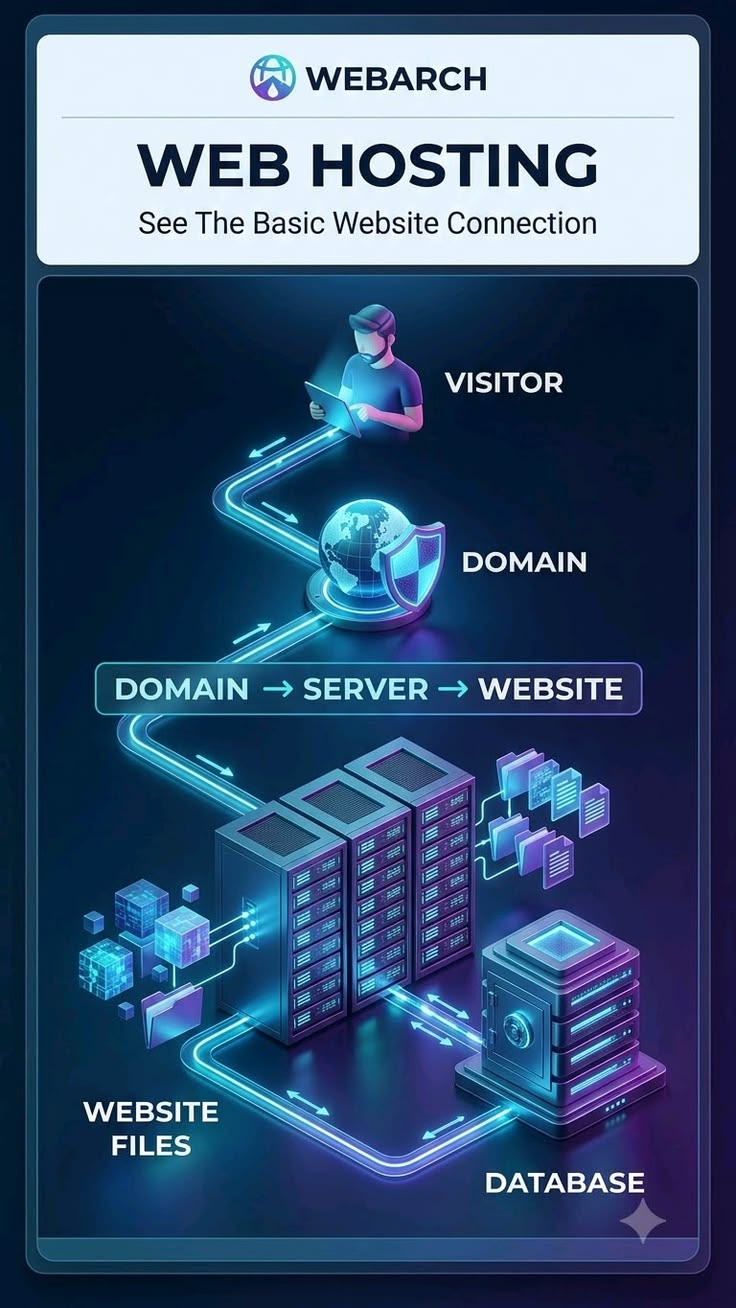
The process involves several components working together.
- Domain name: This is the address people use to visit your website.
- Hosting server: This stores or serves your website’s files and resources.
- DNS: This helps direct your domain name to the appropriate internet services.
- Web browser: This retrieves and displays your website for visitors.
When someone enters your domain name, the browser uses the internet’s domain and routing systems to locate the relevant server. The server then provides the content needed to display your website.
This process usually takes only a few seconds, depending on factors such as the website, server performance, and internet connection.
How to Get Web Hosting with Softlink Options
Getting your website online involves a few important steps.
Step 1: Choose a Domain Name
Start by choosing a domain name that reflects your business, organisation, or project. For example, a Kenyan business might choose a name ending in .co.ke, while other organisations may prefer a different extension.
Choose a name that is easy to remember, relevant to your brand, and available for registration.
Step 2: Select a Suitable Hosting Plan
Your hosting plan should match your website’s requirements and budget.
A small business website may need fewer resources than an online shop with many products or an application serving numerous users. Consider storage, performance, email requirements, security, support, and the possibility of upgrading later.
Visit the Softlink Options website to explore its hosting services and available packages.
Step 3: Purchase Your Hosting Service
Once you have selected a suitable package, follow the provider’s ordering process. Review the package features, billing period, renewal terms, and any additional charges before completing your purchase.
If you need assistance selecting a package, contact Softlink Options for guidance.
Step 4: Connect Your Domain to Your Hosting
Your domain must be configured to direct visitors to the correct hosting service. This may involve updating DNS records or nameservers, depending on your setup.
If you purchase your domain and hosting together, the configuration process may be simpler. DNS changes can take time to become visible across the internet.
Step 5: Create or Upload Your Website
Once your hosting is ready, you can install a content management system such as WordPress or upload your website files, depending on your hosting plan.
With WordPress, you can create pages, publish blog posts, add images, and customise your website without having to write every page from scratch.
If you do not yet have a website, you can explore website design services to help you build one.
Step 6: Test and Publish Your Website
Before promoting your website, check that its pages load correctly and that visitors can navigate the site using computers and mobile devices.
Test your contact forms, links, images, and important information. Make sure HTTPS is configured correctly and that you have a suitable backup and security plan.
Once everything is working as expected, you can begin sharing your website with customers.
Step 7: Maintain Your Hosting and Website
Launching your website is not the end of the process. Keep your software updated, monitor website performance, maintain backups, and renew your domain and hosting before they expire.
Regular maintenance can help reduce avoidable problems and support the long-term reliability of your website.
How Do You Choose the Right Web Hosting Plan?
Before purchasing web hosting in Kenya, compare the features available from different packages.
Consider these factors:
- Storage: Does the plan provide enough space for your website files, images, and databases?
- Performance: Are the server resources suitable for your website’s needs?
- Security: What protections and SSL/TLS options are included?
- Backups: Are backups available, and how often are they created?
- Support: Can you get assistance when you encounter technical problems?
- Email: Does the package meet your business email requirements?
- Scalability: Can you upgrade your hosting as your website grows?
- Cost: What is the initial price, renewal price, billing period, and total cost?
The cheapest package is not always the most suitable. Focus on finding a hosting plan that provides the features and support your website requires.
Why Consider Softlink Options for Web Hosting in Kenya?
Softlink Options provides web hosting and related digital services for businesses and organisations looking to establish or improve their online presence.
When evaluating a hosting provider, look for a suitable package, clear service terms, appropriate security features, and access to technical support. These factors can help you make a more informed decision about where to host your website.
You can visit Softlink Options to explore its services and enquire about the hosting package that best fits your needs.
Frequently Asked Questions About Web Hosting
What is the difference between a domain name and web hosting?
A domain name is the address people use to find your website. Web hosting provides the server resources used to store and deliver your website’s content.
Can I host a WordPress website?
Yes. WordPress websites can run on compatible hosting plans. Check that your chosen package supports the technical requirements of your WordPress installation.
Do I need hosting if I already have a domain name?
Generally, yes, if you want to run a self-hosted website using that domain. You need a hosting service or another suitable platform to serve your website’s content.
Can I change my hosting plan later?
Many hosting providers offer upgrades or migrations to other plans. The available options depend on your provider, package, and website requirements.
How much does web hosting cost in Kenya?
The cost depends on the hosting type, resources, features, and billing period. Check Softlink Options’ current packages for up-to-date prices and included features.
Conclusion
Web hosting is an essential part of making a website accessible online. By choosing a suitable domain, selecting the right hosting plan, configuring your website, and maintaining it regularly, you can establish a stronger digital presence for your business.
Whether you are launching a new website or looking for a hosting solution for an existing one, take time to compare your requirements and available options.
Ready to get your website online? Visit Softlink Options to explore web hosting services and find out which solution suits your business.